Hi Claus,
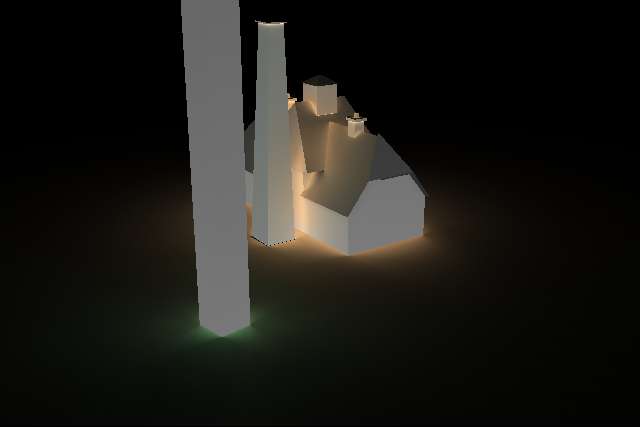
I think if you want to get a smoother result from your ground plane you will need to be more careful about how it is constructed. Direct sampling (subdivision of the source) occurs relative to the "center" of the ground plane geometry, which is why you may not be seeing what you expect. Additionally if the center of a ground plane object is "under" one of the buildings this will contribute to some of the effects that you are seeing. As a test I would consider constructing the ground plane of multiple polygons (probably should be quads) where the edge of a given polygon meets the edge of a building side at the "ground."
I think that another thing to add into your command line is to set direct jitter (-dj). I think you could start out with with -dj .7 and see what happens.
I would try reconstructing your ground plane first and then run as is with your original command line, then you can try setting -dj to further adjust things.
Hope this helps.
-Jack
···
--
# Jack de Valpine
# president
#
# visarc incorporated
# http://www.visarc.com
#
# channeling technology for superior design and construction
On 1/3/2011 8:37 AM, Claus Brøndgaard Madsen wrote:
Hi Thomas and Greg,
Thanks a lot for your feedback to my post.
Happy New Year to everybody.
I spent a good part of my holiday evenings messing around with my problem ... very nerdy, but life with RADIANCE is so inspiring that you sometimes cannot wait until the next official work day J.
Status now is that the noise has "gone" and there is now a new artifact that I cannot get rid of. Thanks, Greg, for the revised and streamlined command line, which I am now using. I must admit that I was so proud of "my own" command line that accepting this revised one was like killing a darling.
In fact I have specified a positive radius for the glow materials. The rendering result I am after is the cosine weighted, hemi-spherical integral of the *direct* incident radiance (caused by the glow materials only). That's why I originally had --ab 0 and then positive radius on the materials. Is using --ab 1 in combination with positive radius going to result in any indirect computation?
In any case I have used Greg's command line verbatim for a new rendering attempt ... see result1.jpg.
I results1.jpg there are 3 things "I don't like":
1)The odd "hot spots" at crease edges
2)The fact that the pole in the foreground does not receive the same irradiance on all sides (which it should since the pole sides facing the camera only receive illumination from the ground plane)
3)The vertical end-plane of the house gets brighter the further away from the groundplane you get ... I am sure it should be the other way around
For these reasons I replaced the single genbox groundplane object with a 10x10 tiling of genbox objects (auto-generated with a small matlab script). With the same command line I arrived at result2.jpg.
While pretty (!) there are still several problems:
1)Weird hot spots at crease edges
2)Dark (under-illumination) at the foot of walls
In an attempt to combat this I tried adding a --ds 0.02 option. This multiplied rendering time by a factor of 5 but resulted in no visible changes (result3.jpg). All images show visible jpg compression artifacts but are in all essence true to the actual result.
The scene is a scale model of a dairy. The scene is modeled in meters, so for example the width of the dairy end wall is 0.07 meters and is one single 6 vertex polygon. As described the ground plane is a tiling of side-by-side genbox objects ... each genbox object is 0.3 meters square. This scene is merely a test scene. When I get to the proper experiments the geometry of a scene will be a triangle mesh generated from stereo camera scans of (parts of) real building exteriors ... kind of like trimesh.jpg where the triangle sizes will be very homogeneous.
So, what is the proper approach: subdivide the geometry (for the test scene or test with the tri-mesh real scenes), or add some rendering option to force a subdivision of whatever needs to be subdivided for the hot spots to disappear?
Best,
Claus
*From:*Greg Ward [mailto:[email protected]]
*Sent:* 31. december 2010 00:37
*To:* Radiance general discussion
*Subject:* Re: [Radiance-general] Noisy irradiance rendering from glow materialsHi Claus,
I am also a little puzzled by your results. As Thomas mentioned, glow surfaces are included in the indirect calculation, so unless you specified a positive radius value for your glow materials, they should not light your scene at all with -ab 0. The complexities of your command line are mostly unnecessary. You should be able to simplify it to:
vwrays -ff -x $XRES -y $YRES -vf $NAME.vp \
>rtrace -h -fff -opN $NAME.oct \
>rtrace -ffc -x $XRES -y $YRES -I -ab 1 -aa 0.1 -ad 4096 -ar 0 $NAME.oct > $NAME.irradiance.hdr
Rays with zero normals will be evaluated as (0 0 0) by the second rtrace, and an epsilon is always added to the origin in the direction of the normal when using the -I option, so your rcalc command, while clever, is unnecessary. I changed your -ab to 1 and got rid of the other unnecessary options. I set -ar to 0, since you seem to want a very high resolution result. I added -aa 0.1 for the same reason.
If you are still getting this peculiar noise pattern after these changes, please post your scene description and I'll have a look at it.
Best,
-Greg
P.S. Regarding mailing list policy on attachments. In general, I prefer that people not attach large files to e-mails, and people have been very good about this, posting larger images on websites, instead. Small JPEGs (less than 100K or so) are acceptable; likewise small text attachments are OK.
*From: *Claus Brøndgaard Madsen <[email protected] <mailto:[email protected]>>
*Date: *December 29, 2010 1:59:30 PM PST
Dear list,
With a lot of inspiration from Thomas Bleicher's tutorial
(http://sites.google.com/site/tbleicher/radiance/stencil\) which he
pointed me to back in August (yes, it took me a while to gather
the courage to go down that path) I have managed to devise a small
script (or rather a command line) which allows me to render the
irradiances received at any point in a scene with all glow
materials (the standard --i irradiance option for rpict does not
work for glow materials).I attach (not so sure about list rules regarding attachments) the
scene rendered where pixel values represent the outgoing radiance
of the glow materials (radiance.jpg) and the scene rendered such
that every pixel represents the incident irradiance in the same
scene (irradiance.jpg). There are no other light sources than the
glow materials.My question is simply: how to reduce the significant amount of
rendering noise for the (near) vertical surfaces? The irradiance
on those surfaces is dominated by energy coming from the
horizontal ground plane, which is a single box object (genbox).I feel I have tried "everything" with the render options (see my
setting below) but have seen no improvement in render noise ...
hope to get some pointers/ideas from the list.I use the following command line command to render the irradiance:
vwrays -ff -x $XRES -y $YRES -vf $NAME.vp \
>rtrace -ffa -opN $NAME.oct \
>sed '1,8d' \
>rcalc -ia6 -of \
-e '$1=$1 + 0.001*$4;$2=$2 + 0.001*$5;$3=$3 + 0.001*$6' \
-e 'out(v)=if(sqrt($4*$4 + $5*$5 + $6*$6) - 0.9,v,-1)' \
-e '$4=out($4);$5=out($5);$6=out($6)' \
>rtrace -ffc -x $XRES -y $YRES -I -ab 0 -aw 1 -ad 4096 -ar 4096
-dt 0.0 -dp 8192 -ds 0.01 -dj 0.9 $NAME.oct > $NAME.irradiance.hdrIn short: use vwrays to generate the primary rays needed to render
the scene, pipe into rtrace to get intersection points and
normals, pipe into sed to get rid of header generated by rtrace
and leave only lines with intersection point and normal, pipe
through rcalc to "lift" intersection points 1/1000 of a unit in
the direction of the normal (to avoid surface self-intersection
problems later when using intersection point and normal as the
start point for an incident irradiance computation) ... and rcalc
also sets a (-1, -1, -1) direction vector if the original surface
normal from rtrace is close to zero length, finally pipe through
rtrace, this time with --I option to gather incident irradiance at
the "lifted" surface point.Best,
Claus
_______________________________________________
Radiance-general mailing list
[email protected]
http://www.radiance-online.org/mailman/listinfo/radiance-general